
Check Point Firewall Integration Guide
Check Point Security Gateway Integration
OpenDBL lists can be imported directly into Check Point Security Gateways natively via SmartConsole Custom Intelligence Feeds (Network Feeds) or via legacy Expert Mode installer scripts.
Native SmartConsole Method (Check Point R80.30 / R81 / R82)
Modern Check Point software supports native HTTPS dynamic threat feeds without requiring shell scripts or Expert Mode access.
Create Custom Intelligence Feed
In SmartConsole, open the Security Policies tab. In the left navigation tree, go to Custom Intelligence Feeds and click New > Network Feed.
Configure Feed Object
Set Name (e.g. OpenDBL_IPSum), paste the OpenDBL list URL (e.g. https://opendbl.net/lists/ipsum.list), set Feed Format to Flat List, and set Update Interval to 15 minutes.
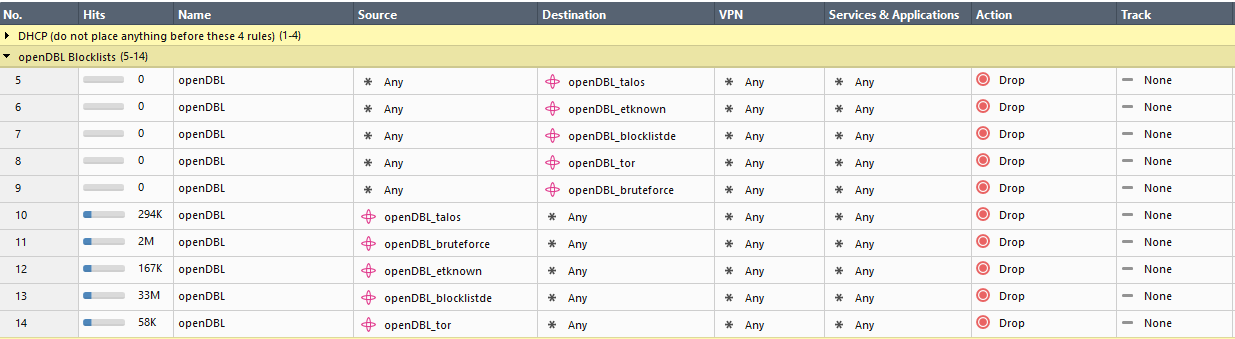
Enforce in Security Policy
Add the Network Feed object into the Source or Destination column of your Access Control policy rulebase and install the policy.
Legacy Expert Mode Script Method (Check Point R80 / R77)
For legacy environments using Expert Mode automated scripts, download and unpack the release package on your gateways:
Check Point scripts from sk103154 may fail to update due to a case-sensitive
grep check on lines 88 and 91 in ip_block.sh.Workaround: Edit
ip_block.sh on your gateway and change grep to grep -i.
Check Point R77.30 Legacy Package
Run sh install.sh inside the unpacked opendbl-installer directory.